
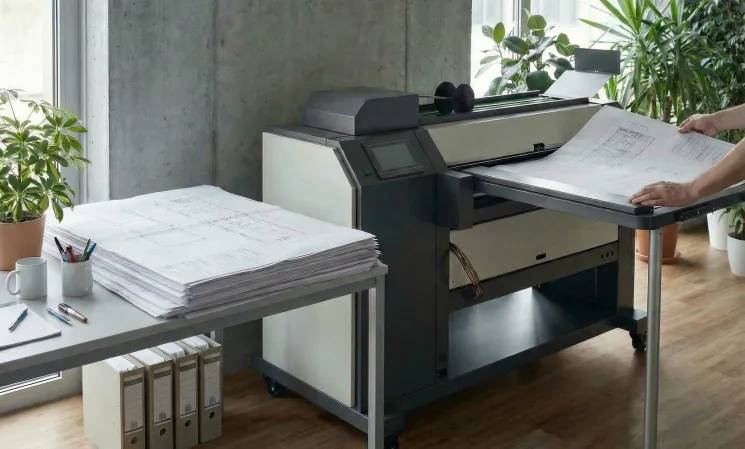
Let’s define the terms:
- Online (in‑line) folder is a unit that is physically and logically integrated with the printer. After printing, the sheet automatically enters the folder without operator intervention. The system is controlled via a shared interface or synchronisation signals.
- Offline (off‑line) folder is a standalone unit into which the operator manually loads already printed sheets. Starting, selecting the folding program, and monitoring are all done at the folder’s own control panel.
The difference goes beyond layout—it’s about workflow logic. Understanding the strengths and weaknesses of each option helps you make a decision that will remain sound as your business grows.
Key comparison criteria
| Criterion | Online | Offline |
| Throughput | Printing and folding happen simultaneously. No idle time for sheet transfer, and no second pass is needed. | The operator spends time loading, starting, and unloading each batch. At high volumes, this step becomes a bottleneck. |
| Autonomy | After the job is set up, the line runs without human intervention. Night‑time print sessions can be scheduled, and folded documents are ready in the morning. | Constant operator presence is required: the operator must load the next stack, monitor the process, and clear any jams. |
| Flexibility | Tightly coupled to one printer (or one line). Not suitable for processing old archives, jobs printed on a different machine, or externally supplied documents. | Universal solution. Can work with any printer, any previously printed documents, and can also serve as a backup unit. |
| Range of Operations | Often limited to basic folding patterns (Z‑fold, C‑fold, double parallel fold) that are supported by the print driver and management system. | Typically offers a wider range: complex fold combinations, perforation, creasing, handling of thick or unusual materials, and manual fine‑tuning of settings. |
| Space Arrangement | Requires a continuous line: printer – receiving / transport module – folder. A dedicated area for output is also necessary. | Can be installed separately in a location convenient for the operator. The line is not tied to a single printer, simplifying layout changes. |
Who benefits from an online folder
1. Large copy shops and print service providers
When daily volumes reach 200–300 A0 sheets or more, manual transfer becomes a serious bottleneck. An online line frees operators to handle customer orders, answer questions, and perform other tasks while boosting job turnaround.
2. Engineering firms, construction companies, and organizations with heavy document output
When drawings and documents are printed in large batches for submission or delivery, speed and consistency matter. Online folding ensures uniform fold quality without human variability.
3. Production facilities with automatic printing mode
Load a batch of jobs in the evening; come back to finished folded documents in the morning. This makes efficient the use of expensive printing equipment outside regular hours.
4. Companies with limited skilled staff
Every employee freed from routine sheet transfer can be assigned to higher‑value tasks, while the folding process runs automatically.
Who benefits from an offline folder
1. Small architecture or design studios
With irregular printing (10 to 50 sheets per day), integrating a folder into a line is not cost‑effective. An offline folder handles occasional jobs quickly and without complex setup.
2. Printing houses and services working with different printing sources
If you have several printers (of different brands) or if customers bring jobs on external media, an offline folder becomes a single finishing point for all of them.
3. Companies that process archived or previously printed documentation
Often there is a need to fold complete sets of drawings that were produced at different times. An online solution cannot handle that.
4. Production with frequent material changes
Vellum, film, heavy paper, laminated substrates—each material may require individual adjustments. An offline folder lets you fine‑tune parameters without interfering with the print system.
Practical recommendations
Assess the stability of your workflow. If volumes are predictable and consistently high, an online solution will pay for itself through labor savings. If volumes fluctuate or have strong seasonality, offline offers greater flexibility.
Analyse your print sources. A single printer that handles 90% of your output is a strong argument for online. If two or three printing devices are in use, plus external files from customers, the versatility of an offline folder becomes an advantage.
Consider the range of materials. For standard office paper and typical sizes, both options work well. If you regularly use heavy or non‑standard media, pay attention to the capabilities of offline folders.
Calculate the total economics, not just the initial cost. An online line requires a larger upfront investment but reduces labour expenses. Offline costs less at the start, but as volumes grow, it may require additional operator time.
Think about future scalability. Some folder models are designed as hybrid: they can be used offline initially, and later integrated into a line with additional modules—without replacing the core unit. This lets you start with an offline setup and upgrade to online when volumes justify it.
Checklist for choosing a folding machine
- What is your average daily print volume (in A0/A1 sheets)?
- Do you run unattended or night‑time print sessions?
- Do you use one main printer or several different ones?
- Do you need to fold previously printed documents or externally supplied jobs?
- What materials do you primarily use (plain paper, vellum, film, heavy cardstock)?
- What is your current automation budget?
- What is the hourly labor cost for an operator in your region / company?
- Are you prepared for a more complex installation (setting up a line) in exchange for full automation?
Choosing between an online and an offline folder is not about chasing the latest technology—it’s about balancing throughput, flexibility, and economics. Online gives you maximum automation and is ideal for high‑volume, consistent production. Offline retains versatility, allows you to work with various materials and sources, and is often the optimal choice for businesses with irregular or mixed workflows.
The right format will not only speed up document delivery but also make the process more predictable, transparent, and less dependent on manual handling.